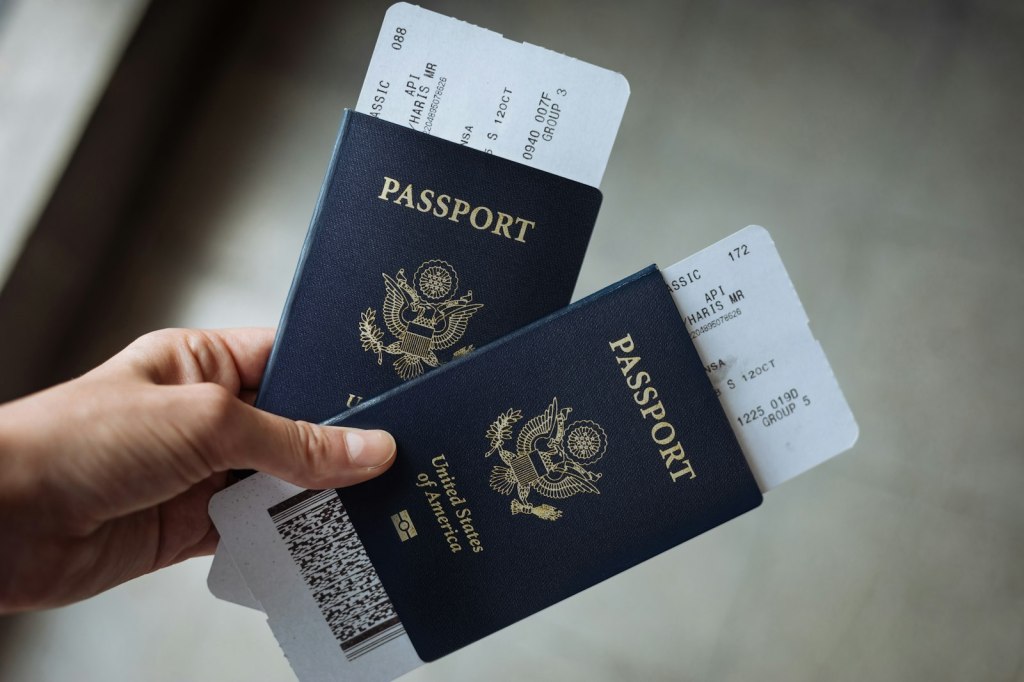
You land, you grab your bag, and you post the obligatory “wheels down” photo: passport, boarding pass, maybe the bag tag still looped around the handle. It feels harmless. It is also one of the easiest ways to hand a stranger your name, your booking reference, your frequent-flyer number and, in some cases, the keys to change or cancel your next flight. Here is what is actually printed on that pass, what someone can do with it, and the simple habits that close the door.
What’s in the barcode
Nearly every airline boarding pass in the world follows one IATA standard, the Bar Coded Boarding Pass (BCBP, Resolution 792). Paper passes default to a PDF417 barcode, and since 2018 the standard also allows Aztec, Data Matrix or QR codes on paper, the formats you already see on mobile passes. The standard defines a fixed set of fields, and the implementation guide is public, so the format is not a secret.
In practice, the barcode carries at least what is printed on the pass: your name, the six-character record locator (PNR), airline, flight number, date, origin and destination, and seat. Depending on the airline it may also carry your frequent-flyer number, a baggage-tag number and other fields. When security journalist Brian Krebs covered this in 2015, a reader had decoded a friend’s Lufthansa pass from a Facebook photo and pulled the name, frequent-flyer number and record locator in seconds. The Aerospace Village puts it plainly: the codes often contain the same personal information as the printed text, and sometimes more, and all are decodable with tools readily available online.
Decoding takes no skill. Free barcode-reader websites and phone apps read a PDF417 or Aztec code straight from a photo. Covering part of the code with a thumb is weaker protection than it looks: 2D codes are built with error correction, and mathematician Hannah Fry noted on The Rest Is Science podcast that you can cover roughly a third of a QR code and it will still scan. A high-resolution photo that gets zoomed in makes a small or partly obscured code easier to read, not harder.
What someone can do with it
The record locator is the piece that matters. Most airline “manage my booking” pages ask for exactly two things: the PNR and the passenger’s last name. Both are on the pass, in plain text and in the barcode. Krebs described the record locator as “essentially a temporary password,” which is a fair way to think about it.
What that login exposes varies by airline, and that is an honest caveat. In the cases documented by Krebs, the reader who decoded the Lufthansa pass could see the friend’s phone number, the name of the person who booked the trip and every future Star Alliance flight tied to the frequent-flyer number, and said he could have changed seats or cancelled upcoming flights. In a 2017 follow-up, security researcher Michal Špaček used a booking code and last name from an Instagram photo to reach a British Airways reservation, where he could cancel flights and view or edit the passport number, nationality, passport expiry and date of birth on file. Cyber-security consultant Lisa Forte of Red Goat scanned her own pass and found her full name and date of birth in the barcode, and notes that a PNR can hold passport details, contact information, the last four digits of a payment card and special-service requests such as medical needs.
Then there is the frequent-flyer angle. United, for example, masks all but the last three characters of a MileagePlus number in its emails, which tells you the airline treats the number as semi-secret. The full number was sitting in the boarding-pass barcode. In 2015 the number plus a last name got past the first step of United’s PIN-reset flow; the remaining step was a security question whose answer (a mother’s maiden name) is often findable on social media. United later added an email confirmation step, but the broader point stands: a program number plus the personal details on a pass is a head start on account takeover and points theft, and it is a convincing starting point for a fake “your upgrade is ready” phishing email that references your real flight.
Forte also tested a dozen airline booking sites in 2018 and found no apparent lockout after repeated wrong codes. Airlines have had time to tighten up since, but we would not bet a trip on it.
Luggage tags and old paper passes
The bag tag is the same problem in a different wrapper. Airline-issued tags carry your name, routing and a barcode, and the booking code is printed on them as well. Forte found that tag barcodes held the same information as her boarding pass and that tags are rarely disposed of securely. Her search of Instagram turned up plenty of readable tags, and many “safe” boarding-pass photos had the name covered by a hand or a passport while the barcode sat in full view. Some tags and receipts also print the phone number you gave the airline.
Paper passes do not stop being sensitive when the flight is over. The record locator usually stays valid for the rest of the itinerary, and a pass left in a seat-back pocket, an airport trash can or a hotel-room bin is readable by whoever picks it up next. Krebs’s advice has not changed in a decade: take them home and shred them.
The Points Capital playbook
Before the trip
- Turn on two-factor authentication on every frequent-flyer and hotel account that offers it, and use a unique password. Points balances are cash to a thief.
- Check whether your airline lets you add a PIN or password to the reservation itself. Not all do; if yours does, it blocks the PNR-plus-last-name login.
- Default to the mobile boarding pass. If you print a backup, treat it like a document, not a souvenir.
During the trip
- Do not post photos of the pass, the bag tag, the ticket receipt or the screen of your phone with the mobile pass open. A full barcode is a full barcode whether it is paper or pixels.
- If you must share a pass, crop or solidly cover the entire barcode and the PNR before uploading. Blur tools and partial thumb-covers are not reliable.
- Pull bag tags off before the “look at my new suitcase” shot.
- Take your paper pass off the plane with you. Never leave it in the seat-back pocket or an airport bin.
After the trip
- Shred boarding passes, bag tags, bag-claim stubs and printed receipts at home. A small cross-cut shredder is a cheap fix; tearing a barcode in half is not.
- Keep anything you need for an expense report or a mileage-credit claim until it is resolved, then shred it.
- Watch your inbox for booking-change, seat-change or password-reset emails you did not trigger, and check your points balances the same way you check a bank statement.
Our take
None of this requires paranoia. The realistic risk is not a movie-style hacker; it is a bored stranger with a free decoder, or a scammer who now knows your flight number and can write a very convincing email. The fix costs nothing: keep the barcode off the internet, keep the paper out of the trash, and lock the loyalty accounts that hold your points. The wheels-down photo looks just as good with the pass out of frame.
Sources
- Krebs on Security: What’s in a Boarding Pass Barcode? A Lot (2015)
- Krebs on Security: Why It’s Still a Bad Idea to Post or Trash Your Airline Boarding Pass (2017)
- IATA: Common Use Standards, including the Bar Coded Boarding Pass (BCBP) standard
- Aerospace Village: Bar Coded Boarding Pass (BCBP)
- Red Goat Cyber Security: The not-so-secret life of boarding passes
- CBS News: Information on boarding pass barcodes poses personal security risk
- Mental Floss: Why ‘Travel Braggers’ Should Think Twice Before Sharing Their Boarding Pass
- LADbible: Warning over posting a photo of your boarding pass even if the QR code is covered (Hannah Fry, The Rest Is Science)
Airline security features change; check your airline’s account settings for the latest protections.




Leave a Reply